If you type “SEO audit tool” into Google, you land on dozens of solutions that all look like the same promise: “analyze your site in 2 minutes, get a complete report.” Except that in practice, these tools don't do the same thing at all. Some crawl your entire site to find technical errors, others score a single page against its Google competition, and others plug into Google Search Console to spot the pages dragging down your performance. These are three different jobs — and picking the wrong tool for your need means wasting hours on reports that will be of no use to you.
This comparison reviews the 7 serious SEO audit tools on the market in 2026, first clarifying what type of audit each one actually performs. Then we detail the strengths and limitations of each, their pricing, and the user profile they fit.
What is an SEO audit, and why run one?
An SEO audit is a status check of a site's or page's organic search. Depending on the angle, it tells you what blocks indexing, what prevents a page from climbing in Google results, or what drags down the site's overall performance. Without an audit, you optimize blindly: you rewrite a title that didn't need it, you add keywords where they already exist, you target topics competitors cover better. A clean audit lets you prioritize fixes by real impact on traffic — instead of ticking boxes at random.
The two families of SEO audit people often confuse
Before comparing the tools, you need to distinguish the two broad families of audit that most comparisons blithely mix up. This is the framework for choosing the right tool.
The one-off single-page audit (before writing, a redesign or link building)
You have a specific page in mind. You want to know why it isn't ranking for its target keyword, and what to fix so it climbs. The tool will analyze this page against its Google top 10 and score its structure, its tags, its semantics, its internal linking, its alignment with search intent. The deliverable: a score out of 100, a prioritized action plan, actionable recommendations line by line. This is what you do before writing a new article, before optimizing a product page, or before launching a link-building campaign on a strategic page.
Tools specialized in this scope: Horusium, Surfer SEO, partially Semrush (SEO Writing Assistant and On Page Checker), Alyze.
The full-site audit (site overview, Google Search Console health)
You have a site that's already live, with hundreds or even thousands of indexed pages. You want to identify the problems invisible to the naked eye: zombie pages that add nothing, cannibalizations (several URLs competing with each other), under-exploited query opportunities, declining trends. The tool will plug into Google Search Console (or crawl your site, or both) to deliver a complete map. The deliverable: a list of pages to merge, delete, optimize or leave alone.
Tools specialized in this scope: Horusium (SEO Health module), Google Search Console, Semrush Site Audit, Ahrefs Site Audit, Screaming Frog (for the purely technical crawl angle).
The classic trap is buying a tool like Semrush or Ahrefs “to run an SEO audit,” without knowing whether you need the one-off audit or the full-site audit. And you end up paying €140/month to use 10% of the features. The grid below sets things straight.
The best SEO audit tools in 2026, compared
| Tool | Single-page audit | Full-site audit | GSC connection | Price | Best for |
|---|---|---|---|---|---|
| Horusium | Yes (8 modules, score out of 100, action plan) | Yes (SEO Health module, GSC) | Yes (native) | Credits that never expire (~€1/audit) | Freelancers, consultants, mature sites |
| Semrush Site Audit | Partial (On Page Checker) | Yes (140+ crawl checks) | Yes | From $139.95/month | Agencies, large e-commerce sites |
| Ahrefs Site Audit | Partial | Yes (technical crawl, 170+ checks) | Yes | From $99/month | Link-building-focused SEOs, agencies |
| Google Search Console | No | Yes (limited to Google native) | — | Free | Everyone, as a complement |
| Screaming Frog | No | Yes (pure technical crawl) | No | Free up to 500 URLs / €239/year | Technical SEOs, technical consultants |
| Alyze | Yes (basic on-page) | No | No | Free | Quick checks, beginners |
| SEOptimer | Yes (100+ criteria, visual report) | Partial | No | From $19/month | SMBs, agencies needing client deliverables |
1. Horusium — Single-page audit + site SEO Health, pay as you go
Horusium is a French platform that covers both audit families in a single tool, with a usage-based model (credits that never expire, no subscription). It's currently the only tool on the French market to offer this dual coverage at this level of depth on both angles.
The one-off single-page audit
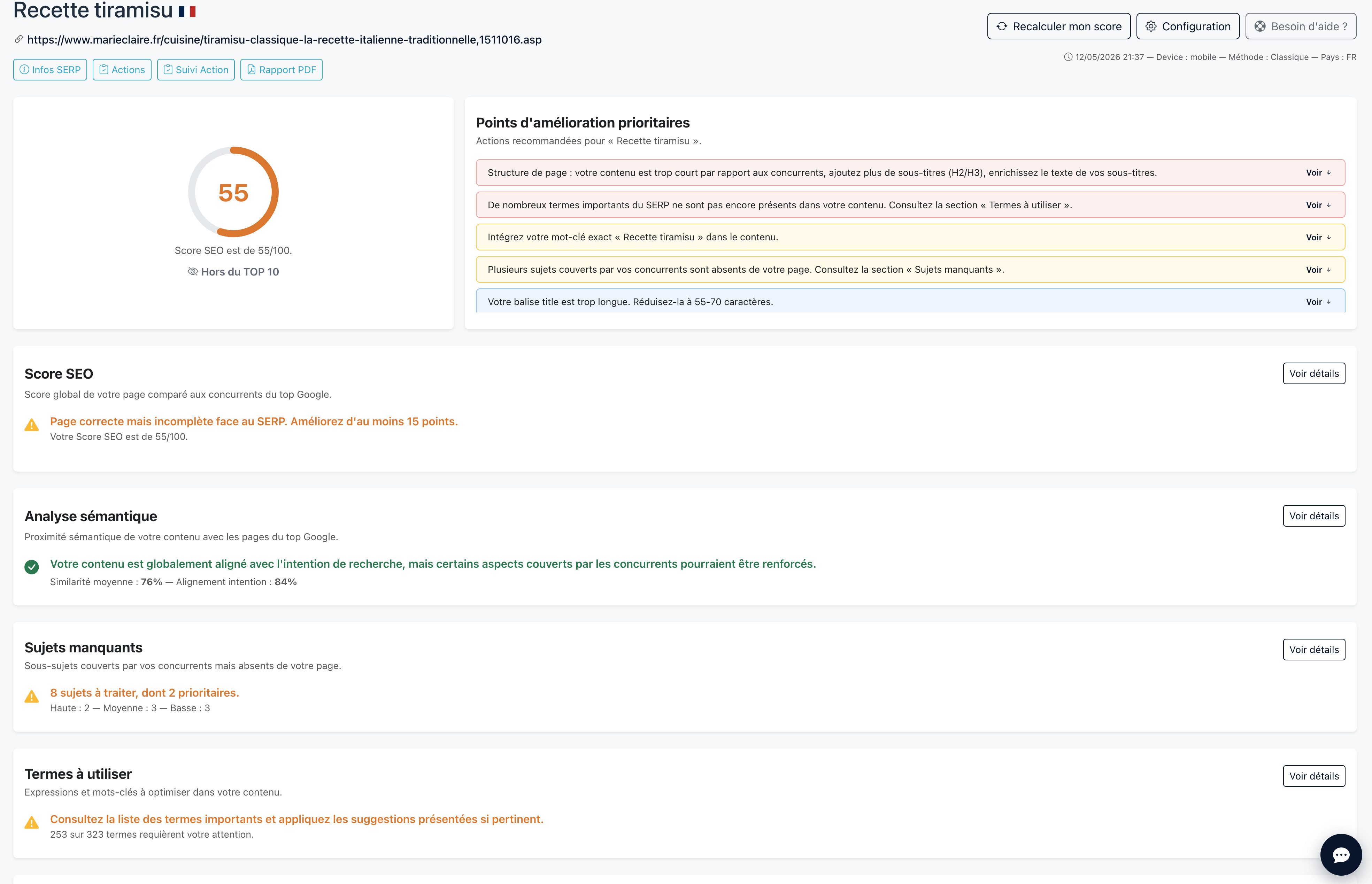
You enter a URL and a keyword, Horusium fetches the Google top 10 for that keyword (mobile, desktop or tablet, in the language and country of your choice), analyzes the competing content and compares your page across 8 dimensions:
- Semantic analysis (alignment with the search intent of the Google top 10);
- Terms to use (salient vocabulary among competitors and its presence in their strong zones: title, H1, H2-H3);
- Missing topics (sub-themes covered by competitors but absent from your page);
- Internal linking (pages on your site relevant to the keyword, with suggested anchors);
- Exact keywords (presence of the target keyword in the title, the H1 and the body);
- Page structure (single H1, word count, headings, compared to competitors);
- Title and meta description length;
- Speed metrics and indexability (noindex, canonical, robots.txt).
You get a score out of 100, an action plan prioritized by recoverable points (fixes are sorted by impact, so you know exactly where to start), and a before/after PDF report to demonstrate progress to a client or management. The score calculation is transparent and can be inspected module by module.
The full-site audit (SEO Health via Google Search Console)
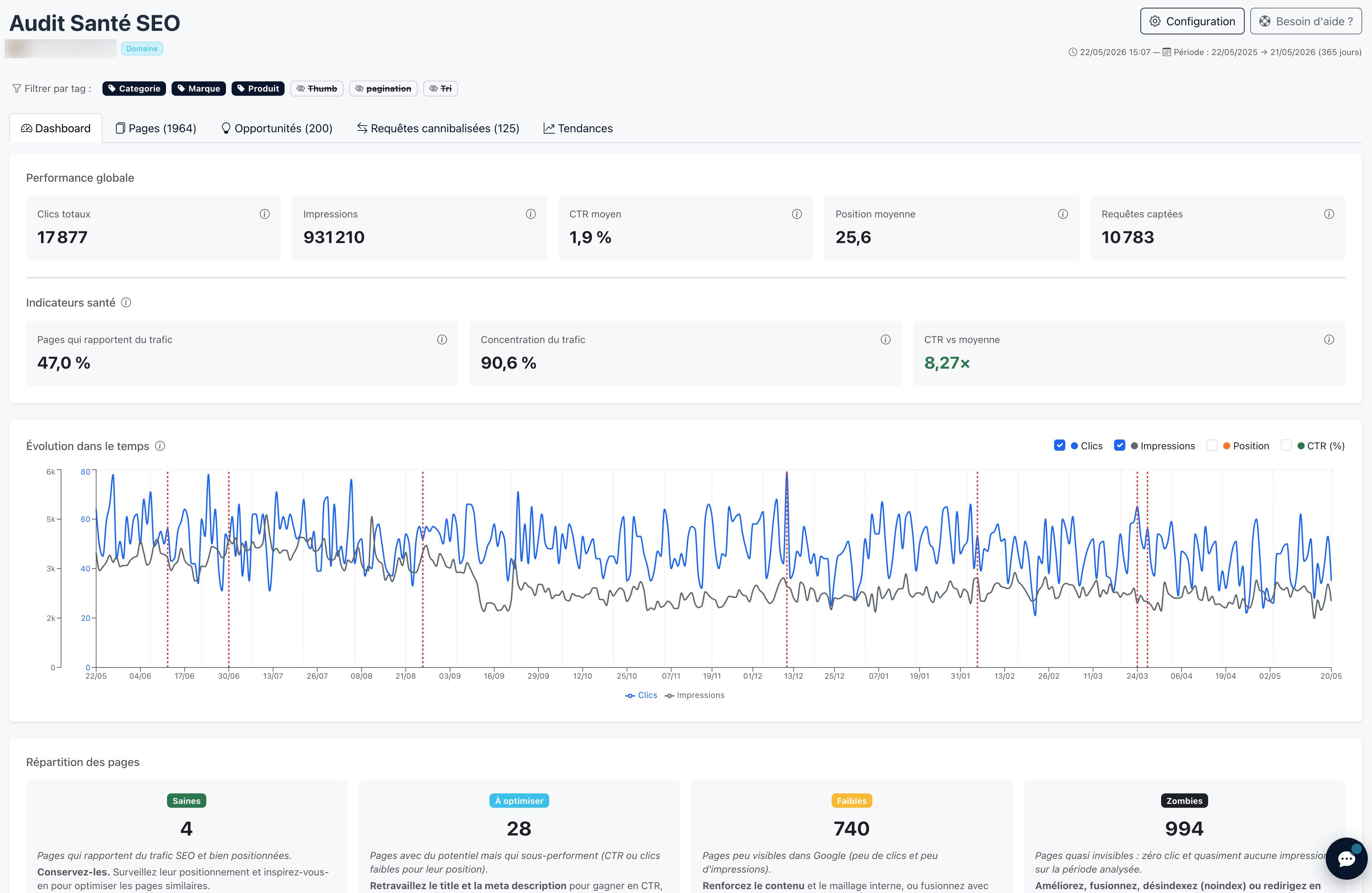
This is the module no other French tool offers at this level of depth. You connect your Google Search Console account in two clicks (read-only), you choose an analysis depth (90, 180 or 365 days), and Horusium delivers:
- A SEO value score out of 100 per page, combining real traffic, SERP performance and semantic coverage depth;
- Detection of zombie pages (pages that add nothing and drag the site down);
- Detection of cannibalization by query, adapted to your site's size, with a risk score and a recommended URL to keep;
- A list of query opportunities (under-exploited, scattered, low CTR despite a good position);
- A trends view (top 50 growing URLs, top 50 declining) on clicks, impressions or position, with Google updates projected onto the curves.
Pricing and trial
1 credit = 1 complete audit (single-page audit or site SEO Health audit, your choice). Packs range from €59 for 60 credits (~€1/audit) to €999 for 2,000 credits (~€0.50/audit). Credits never expire, and one credit is offered on sign-up — enough to run a real first audit without spending a cent or handing over a credit card.
Limitations: Horusium doesn't perform a full technical crawl of the site (sitemap.xml, redirect chains, mass 404 errors) — for that, Screaming Frog or Semrush Site Audit remain more relevant. And no large-scale backlink database (referring domains are included in the single-page audit, but it's not a link-building prospecting tool).
2. Semrush Site Audit — The marketing Swiss Army knife
Semrush Site Audit is a full crawler: you launch an analysis, the tool goes through your entire site (up to several million pages depending on the plan) and surfaces over 140 types of technical errors: missing tags, redirect chains, duplicate content, speed, structured data, sitemap, robots.txt, indexability. It's a serious tool and historically a benchmark.
The downsides: it's heavy (a crawl of 50,000 pages takes several hours), it's expensive (from $139.95/month), and it only becomes worthwhile if you have several large sites to audit continuously. For a freelancer auditing 5 to 10 pages a month, the ROI is low.
The page-by-page audit angle (On Page SEO Checker) is less thorough than a dedicated tool like Surfer or Horusium: it flags missing or overly long tags, but semantic analysis vs the Google top 10 isn't its strong suit.
Best for: agencies managing large-scale e-commerce sites that need continuous technical crawling.
3. Ahrefs Site Audit — Semrush's direct rival
Ahrefs Site Audit offers a very complete technical crawl (170+ checks), with an interface often considered clearer than Semrush's. Ahrefs's big differentiator remains its backlink database, regarded as the deepest on the market. If your SEO strategy relies largely on link building and competitor profile analysis, it's the go-to tool.
Pricing starts at $99/month (Lite plan), and climbs quickly if you want to audit several sites or access all features (full Site Explorer, Content Explorer, etc.).
Worth noting: Ahrefs Webmaster Tools (AWT) is the free version of Ahrefs for site owners. You verify ownership of your domain and get a limited technical audit, but with real Ahrefs backlink data. It's free for life, and it's enough for 80% of cases on your own sites — it's probably the best free tool on the market for that.
On the Horusium side: referring domains are included in the single-page audit (with a comparison to competitors ranking for the target keyword). That's enough to gauge the backlink gap on a strategic page, but Horusium isn't a large-scale backlink prospecting tool like Ahrefs's Site Explorer.
Best for: advanced technical SEOs, link-building-focused agencies, site owners who want top-tier free tooling (AWT).
4. Google Search Console — Essential and 100% free
Google Search Console isn't really an “audit tool” in the strict sense: it's Google's official console that gives you access to your own ranking, impression, click and CTR data. But it's the source no other tool can replace: the volumes are real (not estimated), the positions exact, and indexing visible URL by URL.
The trap is that GSC displays raw data. Without an analysis layer, you quickly see you have 3,200 ranked queries across 800 URLs, and you don't have time to sort out what deserves your attention. That's exactly the role of tools like Horusium SEO Health, which plug into GSC to turn that raw data into an action plan (zombie pages, cannibalizations, opportunities).
Best for: everyone. Install it first, before any other audit tool. Then pair it with a more advanced analysis tool.
5. Screaming Frog SEO Spider — The technical crawler for experts
Screaming Frog is a desktop application (Windows / Mac / Linux) that crawls your site the way Googlebot would, and exhaustively lists: all URLs, their HTTP codes, their titles, meta, H1s, redirects, canonicals, tags, images without alt, etc. It's extremely detailed, and it's the absolute benchmark for a pure technical audit.
The limitations: you have to know how to use it. Without technical SEO background, a Screaming Frog report looks like a wall of Excel tables with no prioritization. It's a senior SEO tool, not a quick-start tool. And it says nothing about the semantic relevance of your pages against their SERP — it's a crawler, not a content analyst.
Free version limited to 500 URLs, paid version at €239/year (individual license).
On the Horusium side: no technical crawl of the site, but a natural parallel with the SEO Health module — which also offers a full-site view, but via Google Search Console data: zombie pages, cannibalizations, query opportunities, growing/declining trends. The two tools are genuinely complementary rather than competitors: Screaming Frog looks at the technical health of the crawl (404s, redirects, indexability), Horusium SEO Health looks at the content and traffic health (what performs, what drags the site down).
Best for: technical SEOs, technical consultants in charge of large sites, IT teams doing migrations.
6. Alyze — The free French on-page audit
Alyze is a long-standing French on-page audit tool. You enter a URL and a target keyword, and Alyze displays the page's HTML structure (title, meta, headings, detected keywords, density, text/code ratio), with basic semantic analysis. It's free, fast, and useful for a one-off check.
The limitations: no comparative analysis with the Google top 10 (no score vs competitors), no prioritized action plan, no SEO Health module. It's a quick diagnostic tool, not a production tool for a consultant who has to deliver a complete audit to a client.
On the Horusium side: the same French on-page audit logic — but compared against the Google top 10 for the target keyword, with a score out of 100 across 8 modules, an action plan prioritized by recoverable points and a before/after PDF report. You go from a one-off structural diagnostic to a complete audit you can deliver to a client, for ~€1 per audit (free credit on sign-up).
Best for: a quick page check, beginners, personal sites that want a first check without committing.
7. SEOptimer — The visual report for client deliverables
SEOptimer is an Australian tool that analyzes a page across more than 100 criteria and generates a clean visual report, exportable to PDF with your logo (on a paid plan). Many agencies use it as a report generator for their clients or as a lead-gen tool on their site (free audit in exchange for an email).
Pricing starts at $19/month (DIY plan), but full white-label export features start at $59/month. The free version gives a simplified report.
On the Horusium side: every audit produces a before/after PDF report customizable with the client's logo, included in the credit spent — no dedicated plan to activate to unlock export. The logic is different: SEOptimer generates a visual report on 100 on-page criteria, Horusium audits against the Google top 10 across 8 modules with a prioritized action plan. For a freelancer delivering audits to clients, it's often the most directly actionable format.
Best for: SEO agencies needing clean client deliverables, sites that want to embed an audit tool for lead-gen.
Checklist for a complete SEO audit in 2026
Whatever tool you choose, here are the checks a serious SEO audit must cover.
Technical side
- No HTTP code >= 400 on the site's important pages;
- Clean 301 redirects (no chains > 2);
- robots.txt that doesn't block crawling of strategic pages;
- Sitemap.xml up to date, submitted to Google Search Console;
- HTTPS active everywhere (no mixed content);
- No accidental noindex on target pages.
Markup and structure
- Unique title per page, 50-65 characters, keyword at the start;
- Unique meta description, 130-150 characters, with a hook;
- A single H1 per page, containing the main keyword;
- Logical, hierarchical H2/H3 structure;
- Correct canonical tags (the page points to itself or to the legitimate canonical version);
- alt attribute on all meaningful images.
Content and semantics
- No “thin” pages (< 300 words, except specific landing pages);
- No internal or external duplicate content;
- Target keywords present in the strong zones (title, H1, H2);
- Semantic coverage aligned with the Google top 10 on the target query;
- Consistent internal linking toward strategic pages;
- Varied, descriptive link anchors (not just “click here”).
Google Search Console (overall health)
- Identifying zombie pages (clicks + impressions ≈ 0 over 90 days);
- Detecting cannibalizations (several URLs on the same query);
- Query opportunities (positions 5 to 20 on high-volume queries);
- Declining pages (loss of clicks or impressions over the last 90 days);
- Abnormally low CTR for a good position (title/meta issue).
Which SEO audit tool to choose based on your profile?
You're a freelancer or SEO consultant → Horusium
You need a tool that covers both audit families (page by page + overall site health), with a clean deliverable (PDF report, prioritized action plan) and a cost that aligns with your real activity. A Semrush subscription at €140/month is rarely worth it when you bill 5 to 10 audits a month — whereas a Horusium credit costs less than a euro.
You manage a mature site that already has Google traffic → Horusium + GSC
Your site has been around for 2-3 years, it already has data in Search Console. Horusium's SEO Health module will surface, in a few minutes, the zombie pages, cannibalizations, poorly exploited query opportunities and declining trends. That's where the biggest traffic gains hide, and it's exactly what GSC alone doesn't tell you in an actionable way.
You manage a large e-commerce site with 50,000+ URLs → Semrush or Ahrefs Site Audit
Beyond a certain size, continuous technical crawling (bulky sitemap.xml, redirects, mass 404 errors, duplicate content across product pages) becomes a topic of its own. Semrush Site Audit or Ahrefs Site Audit are built for that. Pair it with a page-by-page audit tool like Horusium for strategic pages.
You're a senior technical SEO → Screaming Frog (+ Ahrefs)
If you can read a wall of tables and you handle migrations, redesigns or complex JavaScript sites, Screaming Frog remains the most precise tool on the market. Pair it with Ahrefs or Semrush for the backlinks and competitive data.
You just want a quick, free check → GSC + Alyze + AWT
For a one-off check, the 100% free stack holds up: Google Search Console for your own data, Alyze for a quick on-page audit of a URL, Ahrefs Webmaster Tools for the backlinks of your verified sites. It's enough to spot the big problems — not enough to deliver an audit to a client.
FAQ — frequently asked questions about SEO audit tools
What is the best free SEO audit tool?
The combination of Google Search Console + Ahrefs Webmaster Tools is the most solid free stack. GSC for your real ranking data, AWT for the technical audit and backlinks. For a quick on-page check, Alyze (French, free) remains relevant. Horusium offers a credit on sign-up, letting you run a complete audit (page or SEO Health) without paying anything.
How much does an SEO audit cost in 2026?
With an automated tool: between €0 (limited free versions) and €1 to €2 per audit (Horusium). With an SEO consultant delivering a custom audit: between €500 and €5,000 depending on the site's size and the depth expected.
How often should you run an SEO audit?
A full-site SEO Health audit is worthwhile every 3 to 6 months on a mature site, more often in case of a redesign or a traffic drop. A one-off single-page audit is done before each piece of writing, redesign, or link-building campaign on that page — and a re-audit after each optimization to confirm the score climbs.
Which tool detects cannibalization between pages?
Cannibalization is a topic rarely covered in depth by generalist tools. Google Search Console lets you see it if you manually filter by query (and you have the patience). Horusium offers a dedicated module in its SEO Health audit, calibrated to the site's volume (the detection threshold automatically adapts to your site's size to eliminate the marginal long tail), with a risk score per query and a recommended URL to keep. Semrush and Ahrefs offer partial views, less thorough.
Do you need an SEO audit before writing every article?
Beforehand — it's not an audit you need, but an analysis of the SERP for the target keyword (terms to include, topics to cover, competitors' dominant structure). Horusium offers this directly in its SEO writing module, which analyzes the SERP and generates an article aligned with the Google top 10. After publishing, an audit of the newly published page confirms the score and identifies the adjustments to make.
Conclusion: choose the tool that fits your real need
The most common mistake is buying an SEO audit tool “because it's the best known,” without clarifying whether you need a one-off single-page audit or a full-site audit. Both are useful, but at different moments — and most tools cover only one of the two angles at a convincing level of depth.
If you're in France, a freelancer or consultant, and you want a tool that covers both with a clean deliverable and a cost aligned with your activity, Horusium is built for that: single-page audit across 8 modules, site SEO Health audit via Google Search Console, pay as you go with no subscription. If you manage a large e-commerce site, Semrush or Ahrefs remain the benchmarks. If you're a senior technical SEO, Screaming Frog has no replacement. And whatever your situation, Google Search Console is the free foundation to install first.
The right tool is the one you'll actually use every month, not the one with the prettiest homepage.