What is it for?
In SEO, you optimize a lot… and forget everything. What day did you rewrite that H1? When did you add that paragraph? Does last Tuesday's traffic peak come from the Google update or from your intervention the week before?
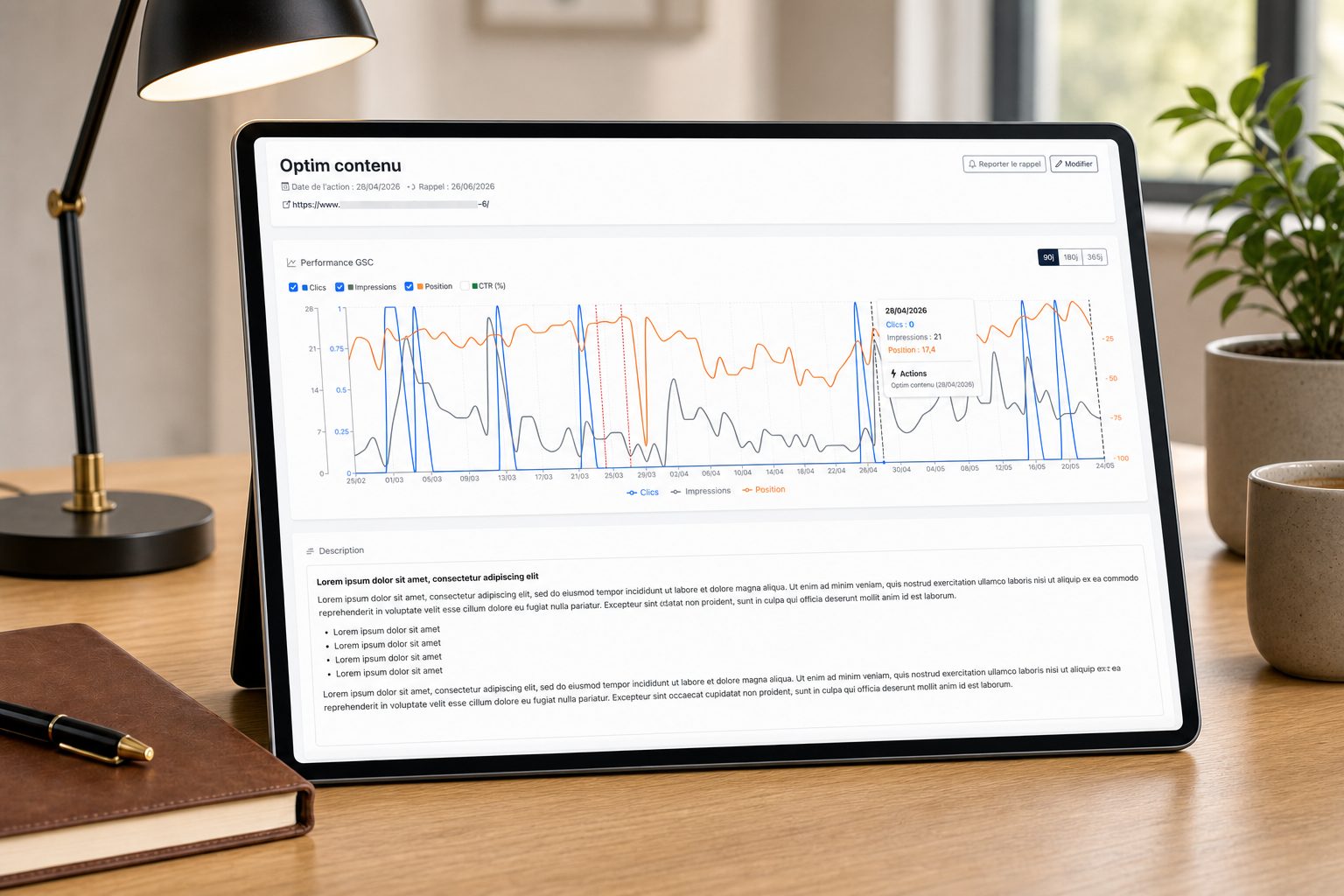
Horusium's Action Tracking is your optimization journal, plugged live into your Search Console. You document each intervention in seconds, and the GSC curve immediately shows a black bar on the date — to see, beyond any doubt, what worked and what changed nothing.
How it works
Three steps — a few seconds per action, and a quantified before/after whenever you need it.
Log every SEO action carried out
Each action is attached to a URL and, optionally, to a main query.
Give it a short name (e.g. “H1 rewrite”, “FAQ added”, “Internal linking cleanup”). Document the why and the how of each intervention.
Date your interventions. Schedule a reminder date: Horusium will send you an email on the day to come back and check the impact.
Connect your Search Console
If your Search Console is connected, Horusium automatically identifies the property matching the action's URL.
If you manage several clients or several Google accounts, Horusium finds the right property among all your connected accounts.
Secure Google OAuth connection, read-only on Search Console. You stay in control of your account, revocable at any time.
No Search Console connected? No worries, you can still track your actions; you'll plug in the data later.
Measure the impact directly on the curve
Clicks, impressions, average position and CTR of the page over 90, 180 or 365 days.
Each action on the same page appears as a black bar on the chart, with the title on hover. You see at a glance which peak or dip matches which action.
If the action targets a specific keyword, switch the curve to isolate its impact on that query rather than on the whole page.
All the other actions recorded on the same page are listed with their date — to compare successive interventions in one click.
To track in Horusium
Anything that can move the curve deserves to be dated. A few concrete examples.
Page rewrites
Rewriting the title, the H1, the intros, revamping the content: date each change and watch the evolution of clicks and position.
Internal linking
Adding links from other pages, changing anchors: see whether the target page takes off after the intervention.
Migrations & redirects
Document a 301, a URL change, a page merge. The before/after curve becomes your best judge.
E-E-A-T optimization
Adding a FAQ, author, sources, update date: note when you did what and measure the effect.
Acquired backlinks
When a new external link points to your page, date it. The GSC curve will tell you whether authority really progresses.
Technical fixes
Indexing, schema.org, speed, mobile, canonical tags: a quantified before/after to prove the value of the work done.
Built for SEO pros
Everything you need to track, measure and prove the real impact of your optimizations.
Live Search Console curve
Clicks, impressions, average position and CTR over 90, 180 or 365 days, updated daily.
Action bars on the chart
Your interventions show up as black bars on the right dates, with the title on hover. The before/after becomes obvious.
Zoom on a query
Display the performance of the whole page, or isolate the impact of your action on a specific keyword.
Email reminders
Schedule a date to come back and check the impact. Push the reminder back if the effect takes its time.
Dashboard per domain
Your actions are automatically grouped by site, with a counter and favicon. Ideal in a multi-client agency.
Browsable history
All the past actions on a page are listed on its record. Your SEO memory is never lost.
Rich description
A rich text editor to document the why and the how of each action, with lists and formatting.
Secure Google connection
Read-only on Search Console, you stay in control of your account. Revocable at any time.
100% free
No credit used. Track as many actions as you want, without a subscription.