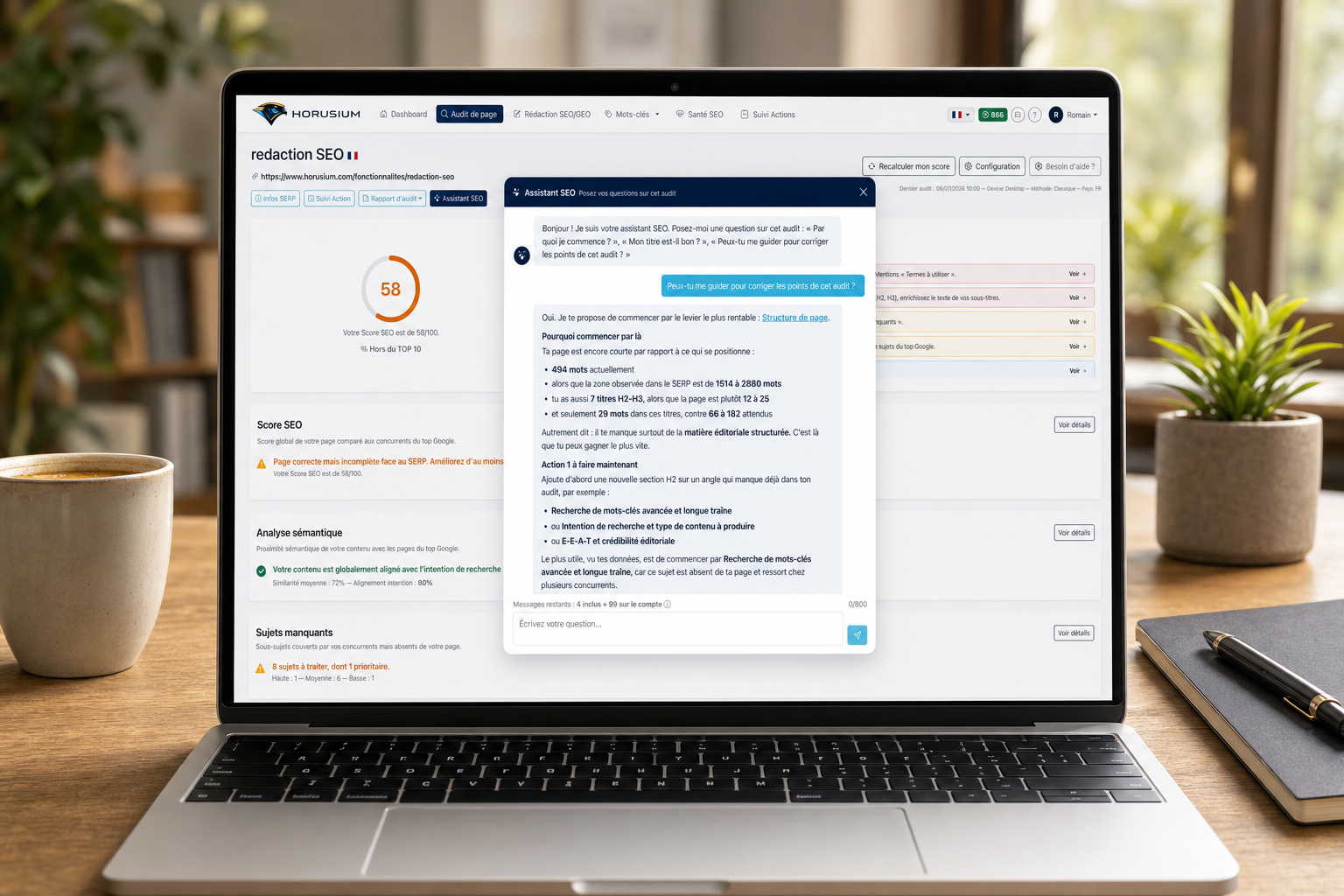
What is it for?
A complete SEO audit is sometimes a lot of information at once: a score, a dozen modules, dozens of recommendations. And the question that always comes up: where do I start, and how do I actually fix it?
Horusium's SEO assistant is a conversational SEO chat built into every audit. You ask your questions in plain language, and it answers based only on your audit's data: it tells you where to start, explains each point, guides you step by step through the fixes, and points you to the right place in the interface. Like a consultant with your audit right in front of them.
How it works
Three steps — the assistant is available right from your audit page.
Open the assistant from your audit
The “SEO assistant” button sits on the detail page of every completed audit.
No need to re-explain anything: the assistant has the full audit context (score, modules, competitors) in memory.
Available once the audit is finished and the score computed. Nothing to install, nothing to configure.
Ask your question in plain language
Write as you'd talk to a colleague. No syntax or command to learn.
Answers rely only on your audit: your real values, your competitors, your score. No generic advice.
The assistant also acknowledges your strengths and gets straight to the point.
Follow the guidance and fix
Ask “where do I start?” and the assistant ranks the fixes by impact, one after another.
When it names a module (Terms to use, Internal linking…), the name becomes a link that opens the right audit section.
It can write a title tag, a meta description or an H1 suggestion for you, ready to use.
What to ask it
A few example questions that instantly unblock your optimization.
« Where do I start? »
The assistant ranks actions by impact and gives you the first one to tackle.
« Is my title good? »
It evaluates your title tag against competitors and can suggest an optimized, ready-to-paste version.
« Can you guide me to fix this audit? »
It rolls out a step-by-step plan and walks you through it point by point.
« Which terms am I missing? »
It flags the important words and phrases missing from your content and points you to the Terms to use module.
« What topics do my competitors cover? »
It lists the sub-topics covered by the top 10 and missing from your page, to fill in first.
« Is my link profile strong enough? »
It compares your referring domains to your competitors' and advises you on what to do next.
Why it's a real plus
A copilot that turns a dense audit into a clear action plan.
100% contextual
The assistant only answers about your audit: your real values, your competitors, your score. Zero generic advice.
Step-by-step guidance
It turns the list of recommendations into a prioritized action plan, handled point by point at your pace.
Smart navigation
Cited modules become links: one click opens the right audit section and expands it automatically.
Writes your tags
Title, meta description, H1: the assistant writes the short elements ready to paste. For long content, it points you to the right module.
Acknowledges your strengths
It doesn't just list flaws: it also highlights what's working, so you don't break what already performs.
Answers in your language
Auditing an Italian site from a French account? The assistant understands the audited content and answers you in French.
5 messages included per audit
Each audit includes 5 free messages. After that, 1 credit = 50 messages, usable across all your audits.
Zero configuration
Available as soon as the audit is finished, right in the interface. Nothing to install.